🎯 Best Online Maths Games for Year 2 and Year 4 Students [2025 UK Guide]
Why Maths Games Are Important for Year 2 and Year 4 Students
In the UK, children greatly benefit from using online maths games for Year 2 and Year 4 practice to sharpen their quick calculation skills.
Helping children build strong maths skills early is essential for long-term success. In the UK, Year 2 and Year 4 are especially critical years:
Year 2 students need quick recall of number bonds, addition, and basic multiplication.
Year 4 students face the Multiplication Tables Check (MTC), testing instant recall up to 12 × 12.
Maths games turn repetitive practice into something exciting and rewarding. They tap into natural curiosity and competition, boosting speed, confidence, and enjoyment — exactly what’s needed at these key stages.
As a teacher, I’ve seen first-hand that the right game can unlock a child’s potential faster than traditional worksheets alone.
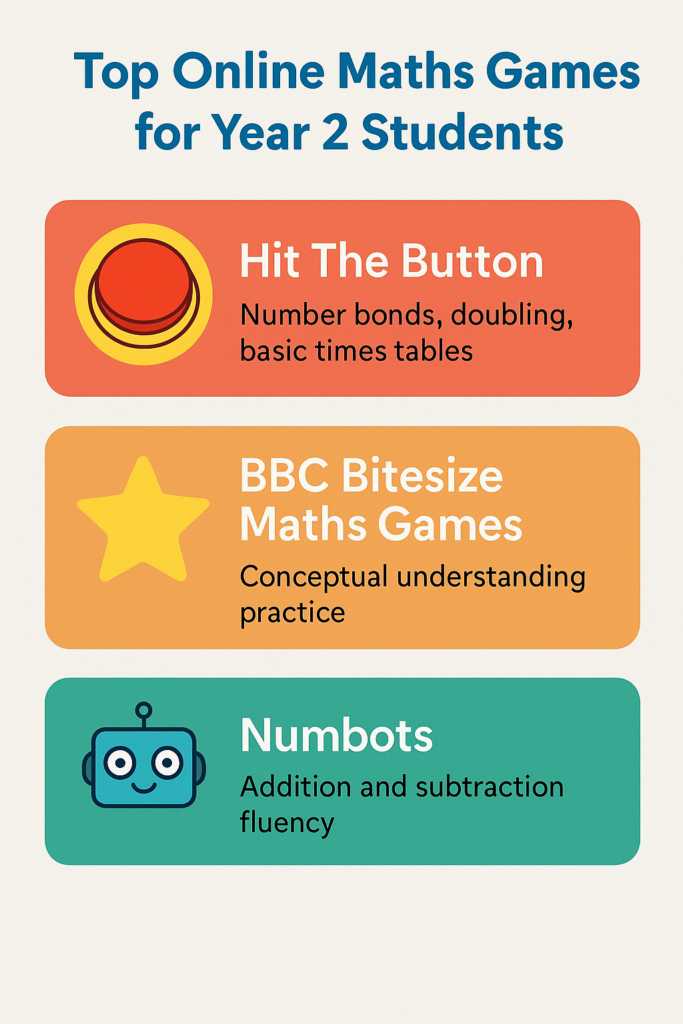
Top Online Maths Games for Year 2 Students
For younger learners in Year 2, the best games focus on foundational skills: addition, subtraction, and early multiplication.
Here are the top picks:
1. 🎯 Hit The Button
Best for: Number bonds, doubling, basic times tables
Why we love it:
Quick-fire questions to improve recall speed.
Fun timed challenges keep students motivated.
Simple, clean design – no confusing animations.
Tip: Start with number bonds up to 10 and 20 before moving into doubling and early times tables.
[👉 Learn more in our detailed Hit The Button Review.]
Best for: Conceptual understanding alongside practice
Highlights:
Short interactive quizzes aligned with the UK curriculum.
Friendly characters and explanations.
Covers shapes, money, time, and basic number operations.
3. 🧡 Numbots
Best for: Building addition and subtraction fluency
Features:
Story-based learning journey.
Gradual difficulty increase to ensure mastery before moving forward.
Great for reluctant learners who need encouragement.
Top Online Maths Games for Year 4 Students
For Year 4 learners preparing for the MTC, speed and accuracy with times tables are vital.
Here’s what works best:
1. 🎯 Hit The Button (Again!)
Best for: Multiplication and division quick recall
Why it’s essential for Year 4:
Tailored “Times Tables” and “Division Facts” modes.
Customisable focus — you can target tricky tables like 7x, 8x, and 12x.
Builds speed needed for 6-second answer time on MTC.
Teacher Tip: Use it daily for 5 minutes for maximum impact.
2. 🏆 Times Table Rockstars
Best for: Gamified times tables practice
Strengths:
Avatars, coins, and rewards keep students hooked.
Multiplayer mode encourages friendly competition.
Useful data tracking for teachers and parents.
3. 💻 Math Playground
Best for: Wider range of problem-solving and logic skills
Features:
Games that go beyond calculations (e.g., reasoning, patterns).
Great for stretching higher-achieving Year 4 pupils.
Focus on fun challenges and logic puzzles.
How to Choose the Right Maths Game for Your Child
Not every game fits every learner perfectly. Here’s how to make a smart choice:
✅ Match the current skill level: If your child struggles with number bonds, start simple before jumping to times tables.
✅ Focus on engagement style: Some children thrive with competitive elements (TTRS), others prefer calm repetition (Hit The Button).
✅ Think short sessions: The best results come from daily 5–10 minute bursts, not long, tiring sessions.
Teacher Tips for Using Maths Games in Class
🧑🏫 As a teacher, here’s how I’ve successfully used games in the classroom:
Morning Warm-Ups: Start lessons with 5 minutes of Hit The Button challenges.
Small Group Rotations: Set up tablets at a station with different games running.
Maths “Challenge of the Week”: Reward high scorers with certificates or shout-outs.
Games create a positive maths culture in the room — children start seeing maths as a fun skill to master, not a scary subject.
Final Thoughts: Building Confidence Through Play
Choosing the right online maths game for your child can make a real difference, especially during critical learning years like Year 2 and Year 4. Tools like Hit The Button, Times Table Rockstars, and BBC Bitesize can transform daily practice into an adventure.
Start with games that match your child’s needs, keep sessions light and enjoyable, and watch as their speed, accuracy, and confidence soar.
👉 Ready to get started? Try Hit The Button today and see the magic happen!
Choosing the best online maths games for Year 2 and Year 4 students can turn practice time into a fun adventure!
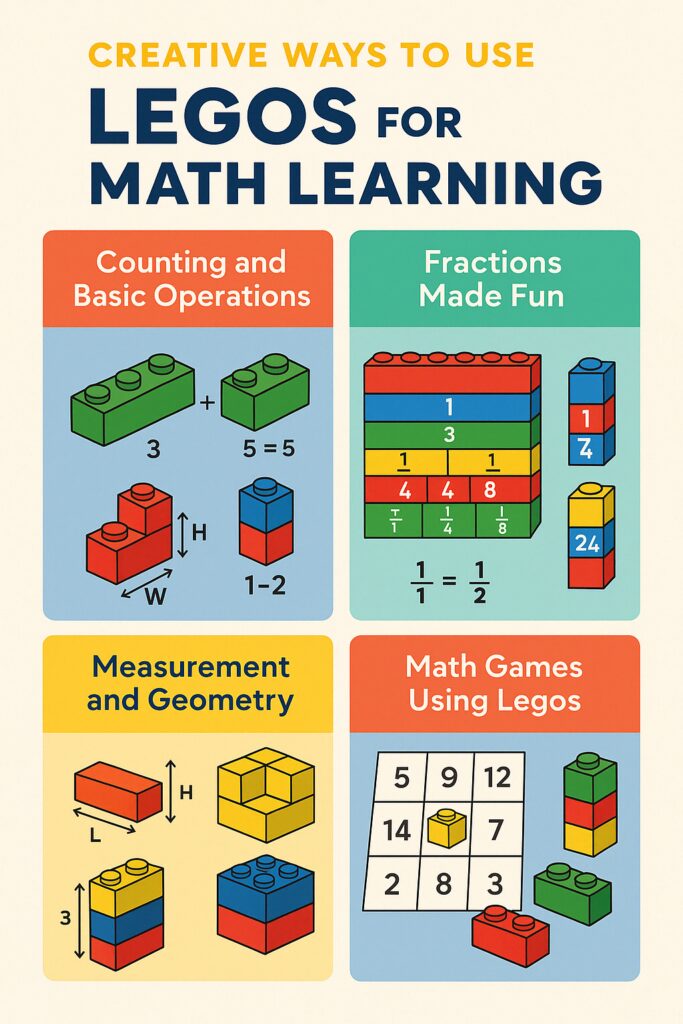
Creative Ways to Use Legos for Math Learning
When most people look at Legos, they see toys. But if you take a closer look, you’ll discover they’re actually tiny tools for teaching math. With their built-in structure, colors, and endless combinations, Legos make math hands-on, visual, and—best of all—fun. Let’s explore how you can turn a box of bricks into a powerful learning experience.
🧠 Why Legos Work for Teaching Math
Legos aren’t just about building towers—they naturally teach math concepts like counting, symmetry, sequencing, and logic. Kids learn by touching, moving, and experimenting, which makes the learning stick.
✔️ Built-in Math Structure
Every brick is built on a unit system. When kids compare sizes—like two 2-stud bricks matching one 4-stud brick—they’re actually seeing math in action.
✔️ Tactile, Hands-On Learning
Legos allow kids to feel math. They count studs, measure height, and literally build answers brick by brick.
✔️ Mistakes Don’t Hurt
When something doesn’t add up, it’s easy to take apart and try again. This encourages a growth mindset and removes the fear of getting it “wrong.”
➕ Teaching Basic Math Concepts with Legos
✅ Addition and Subtraction
Addition: Snap a 3-stud brick to a 2-stud brick and count the total (5).
Subtraction: Use two colored bricks—like a 5-stud red and a 2-stud blue. Remove one to see what’s left.
Division: Take a 12-stud brick and split it into 3-stud groups. Count how many fit. Done!
🧩 Making Fractions Understandable
🍕 Fraction Walls
Build rows with bricks like 1-stud, 2-stud, and 4-stud to demonstrate halves, quarters, and eighths. It’s math that kids can see and touch.
🎨 Comparing Fractions
Stack 1/2 next to 2/4. Kids instantly recognize they’re the same size—no memorization required.
📏 Measurement and Geometry
📐 Measure with Bricks
Use bricks as non-standard units to measure pencils, books, or desk length. Kids learn about length, width, and height.
🧱 Building 2D and 3D Shapes
Construct squares, rectangles, cubes, and more. This boosts spatial awareness and shape recognition.
🔢 Area & Volume
Lay bricks flat to count surface area, or fill a box to demonstrate volume. It’s math you can build and see.
🎨 Sorting and Patterning
🟡 Sort by Color, Shape, or Size
Sorting helps with classification and early logic. Give a pile of bricks and ask your child to sort by color or the number of studs.
🔁 Create Patterns
Start a pattern like red-blue-red-blue and ask them to finish it—or create one with increasing stud numbers.
🎲 Math Games Using Legos
Lego Bingo: Solve math problems and cover answers on a Bingo board using bricks.
Scavenger Hunt: Hide bricks with problems written on them. Solve to collect.
Race to Build: Shout a math problem and race to build the correct answer with bricks.
💵 Real-World Math with Legos
🛒 Mini Budgeting with Lego Money
Assign values to bricks and let kids “shop” with them. This builds budgeting and money sense.
🧍♂️ Story Problems with Minifigs
Create real-world math problems using Lego people: “Sara has 4 yellow bricks. She gives 1 to a friend…”
🔢 Understanding Place Value
🔟 Units, Tens, and Hundreds
Use different-sized bricks to show number places. One stud = unit, a 10-stud brick = ten, and so on.
🎨 Color Code Place Values
Use blue for units, green for tens, and yellow for hundreds. Color helps organize numbers visually.
🧮 Introducing Algebra the Easy Way
❓ Using Bricks as Variables
Use a red brick as “x.” Combine it with others to model problems like x + 2 = 5.
⚖️ Balancing Equations
Build a Lego balance to show that both sides of an equation should be equal—literally!
📊 Graphs and Data with Bricks
📈 Bar Graphs
Tally votes (like favorite animals) and build colored towers to represent results. The tallest tower wins!
🥧 Lego Pie Charts
Use circular bases and different brick segments to show percentages in a pie chart.
🕒 Teaching Time with Legos
🕰 Build a Clock
Design a clock face and use long and short bricks as hands. Great for teaching analog time.
⏳ Practice Elapsed Time
Start a task and use Lego bricks as minute markers. Helps visualize time passing.
🔧 DIY Lego Math Tools
Number Lines: Snap bricks in a row and label each stud as a unit.
Flash Cards: Stick math problems on one side and answers on the back. Flip to test yourself.
🏫 Tips for Parents and Teachers
🗓 Make Lego Math a Routine
Just 10 minutes a day can make a big difference. Use it as a warm-up or cool-down activity.
📚 Align with Curriculum
Match Lego tasks with current lessons. Studying shapes? Build them. Fractions? Stack them.
🧺 Keep It Organized
Use bins or bags to group math topics—like “place value” or “geometry”—for easy access.
🧠 Conclusion
Lego isn’t just for castles and cars. It’s a brilliant, kid-approved way to teach math—without it feeling like a lesson. Whether your child is learning addition or tackling early algebra, these bricks can bring math to life, one colorful click at a time.
❓FAQs
Can all ages use Legos for math learning? Yes! Younger kids explore basic operations, while older kids can dive into fractions and algebra.
What if I don’t have many Legos? Even a small set of 20–30 mixed bricks is enough to get started.
Do Lego math activities match school standards? Most definitely. Especially for tactile and visual learners.
What skills can improve with Lego math? Everything from counting, logic, and geometry to problem-solving and critical thinking.
Where can I find more Lego math ideas? Check Pinterest, teacher blogs, and YouTube for free resources and printables.
Master Division with Hit the Button – A Fun, Fast Game for Daily Practice
Problem
Many students struggle with division:
They rely heavily on multiplication recall but forget inverse facts.
They lack confidence and speed.
Traditional worksheets are slow and disengaging.
This creates a gap in mental math fluency — especially in grades 2–5.
Solution
The Division Mode in our Hit the Button game plugin is built specifically to fix this problem.
If your child struggles with division, they don’t need another worksheet—they need a fast, fun game that teaches them through repetition, feedback, and confidence-building. The division mode on Hit the Button does exactly that.
🎯 Start with just 5 minutes a day. See results in a week.
Why Your Child Struggles With Mental Math (And How to Fix It with Games)
It’s a scene every parent or teacher knows well — a child freezing up during a simple math question or taking too long to calculate mentally. Mental math is a vital skill that impacts not only school performance but everyday decision-making. Yet, many children struggle with it due to fear, poor memory retention, or lack of daily practice. The good news? You can fix it — not with more worksheets, but with targeted practice and game-based learning.
This article isn’t just another list of math games. You’ll learn:
Why kids struggle with mental math (scientifically)
What teaching methods fail — and what works
How to use your own game plugin (Hit the Button) to build mental speed
A daily action plan you can implement at home or school
Bonus: Watch a real gameplay video
Section 1: The Real Reasons Kids Struggle With Mental Math
Cognitive overload: Solving math in your head needs working memory + number fluency.
Math anxiety: Pressure and fear of mistakes slow kids down.
Lack of repetition: Kids don’t get enough low-pressure, fun practice to build speed.
Over-reliance on calculators or visuals.
Section 2: What Actually Works (Backed by Research)
Spaced repetition: Practice small chunks consistently (5–10 minutes/day).
Gamification: Motivation through points, scores, and levels.
Multisensory learning: Games stimulate visual + motor skills.
Immediate feedback: Kids see if they’re right/wrong in real time.
Section 3: Use HitTheButton.online to Fix the Problem
Your plugin is the perfect solution. Here’s how to use it:
Choose a Focus Area Times tables, doubling, division, or square numbers.
Let Them Play for 5–10 Minutes Use a timer to make it consistent.
Track Progress Use the built-in score system. Challenge your child to beat yesterday’s score.
Section 4: Daily Routine Plan for Results
Day
Focus
Time
Goal
Mon
2x & 3x tables
5 min
80% accuracy
Tue
Doubles & Halves
5 min
Fast recall
Wed
Division
5 min
No pause
Thu
Random Tables
5 min
Improve speed
Fri
Challenge Mode
10 min
Beat high score
Section 5: Value-Add for Parents & Teachers
For Parents: Turn this into a bonding session. Play the game with your child.
For Teachers: Use it as a warm-up activity or assign it for homework.
Track growth with printed charts or Google Sheets.
Don’t let your child’s struggle with mental math continue. With just 5 minutes a day and the right tool, you can turn frustration into confidence. Hit the Button isn’t just a game—it’s a brain trainer in disguise.
How to Help Your Child Master Times Tables – A Parent’s Guide with Free Tools
Many parents struggle when it comes to helping their children master multiplication tables. The traditional “rote memorization” method doesn’t work for every child—and frustration can build fast. But there are smarter, research-backed techniques and tools that can make the process enjoyable and effective.
In this guide, we’ll share proven tips and interactive tools that help children understand and memorize times tables with ease. We’ll also show you how to use our free Hit the Button plugin to practice in a fun, game-like environment.
Section 1: Understand Why Times Tables Are Hard
Abstract numbers confuse kids without context.
Learning styles differ: some kids need audio, others visuals, others repetition.
Lack of daily practice breaks retention.
Section 2: 5 Powerful Strategies to Make Learning Times Tables Easier
Start with Patterns Teach kids the easy tables first (0s, 1s, 10s) to build confidence.
Use Rhythmic Techniques Sing multiplication facts like songs (e.g. “5, 10, 15…” to a beat).
Daily 5-Minute Challenges Consistency matters more than duration. Keep sessions short and sweet.
Apply it in Real Life Ask questions like: “If we have 3 packs of gum and each has 5 pieces, how many total?”
Use Gamified Practice Tools Tools like Hit the Button turn repetition into fun—speed, feedback, and rewards drive motivation.
Section 3: How to Use Our Hit the Button Game Plugin to Practice
Step 2: Choose “Times Tables” and select a number set (e.g. 2x, 5x, or random).
Step 3: Encourage your child to play and beat their own score.
Step 4: Track progress weekly and reward improvements.
Times tables don’t have to be a battle. With the right mindset and tools like Hit the Button, your child can gain confidence in multiplication and even have fun doing it. Just 5 minutes a day can build a foundation for lifelong math success.
Best Math Games for Kids – Top 5 Tools to Make Learning Fun
Let’s face it—most kids don’t jump for joy at the idea of practicing math. Parents and teachers alike often struggle to keep students engaged in daily math drills. But what if you could turn boring math problems into an exciting game? That’s where online math games come in — a proven way to help children develop their skills through interactive learning and gamification.
We’ve handpicked 5 of the best free math games for children that are fun, effective, and completely free to use. These tools can be used at home, in school, or for tutoring.
Hit the Button (Your Plugin)
Focus: Times tables, number bonds, doubling, halving, division
Why it’s great: Ad-free, fast, and designed by educators. Great for warm-ups and speed practice.
Math Playground
Focus: Problem solving, logic games, and visual math
Great for: Elementary students
Features: Puzzles, arcade games, and brain training activities
Khan Academy Kids
Focus: Adaptive math curriculum with progress tracking
Age: 4 to 8 years
Features: Engaging characters and leveled math missions
Prodigy Game
Focus: RPG-style math battles
Best for: Grades 1–8
Why kids love it: Leveling up characters while solving math challenges
SplashLearn
Focus: Personalized math lessons for ages 4–10
Features: Tracks mastery, offers reports for parents/teachers
The right math game can make all the difference in your child’s learning journey. From RPG adventures to quick-fire drills like Hit the Button, these games combine fun with function. Try them out, and see how quickly math time becomes the best part of the day!
Hit the Button – Improve Mental Math Skills with Our Game Plugin
Tired of dull worksheets and overpriced apps just to help your child get better at mental math? You’re not alone. Many tools are either boring, full of ads, or just don’t work. Kids lose interest quickly when practice isn’t engaging.